AI medical billing is the use of AI on the work that gets a practice paid: checking claims before they go out, sorting the denials that come back, drafting appeals, and reading accounts receivable reports. Most of that work is reading documents and spreadsheets. That is the part AI does well.
The part it does not do well is deciding. Which denial is worth appealing, which code fits the visit, and when to call the payer are judgment calls with money and compliance attached. A good AI billing setup draws a hard line between the two. This guide shows where that line sits, with examples from real workflows and synthetic data.
ClinicFrame publishes this guide. Our product helps billing teams with denials, appeals, and A/R reviews. It does not submit claims or assign codes, and we say so where it matters below.
What Is AI Medical Billing?
The billing cycle has many steps, and different kinds of software apply AI to different ones. Seeing them on one map makes the market easier to read.
| Stage | What AI does there | Who usually sells it | What stays with a person |
|---|---|---|---|
| Eligibility and auth | Checks coverage, tracks authorization status | Clearinghouses, voice agent vendors | Calls that need negotiation |
| Coding | Suggests codes from the note | Coding and EHR vendors | A certified coder or the clinician approves |
| Claim scrubbing | Flags errors and likely denials before submission | Claims platforms | Fixing what is flagged |
| Denials | Groups denials by payer and reason, ranks which to work | Claims platforms, analytics tools, AI assistants | Choosing what to appeal |
| Appeals | Drafts the letter from the denial and the chart | Claims platforms, AI assistants | Checking facts and signing |
| A/R review | Reads aging and payment exports, finds patterns | Analytics tools, AI assistants | Deciding follow-up and write-offs |
So "AI medical billing" is not one product. It is a set of features spread across claims platforms, EHR billing modules, specialist vendors, and general AI assistants. Before you compare any of them, decide which stage costs your team the most hours.
Where AI Helps: Denials, Appeals, and A/R
For small and medium practices and billing companies, the back end of the cycle is where AI pays off fastest. The work is repetitive, document-heavy, and does not require touching the claims system.
Denials
A denials export from your billing system is a spreadsheet with payer, date of service, reason code, amount, and status. Sorting it by hand each month takes hours. An AI tool that runs real calculations on the file can group it by payer and reason in seconds and show what changed since last month.
How the calculation runs matters. A model that "reads" a spreadsheet and estimates totals can be wrong in ways that are hard to spot. ClinicFrame writes and runs code over the file in an isolated environment and returns a table, a chart, and an Excel file. The same file gives the same numbers every time, and every figure traces back to rows in your export.
Appeals
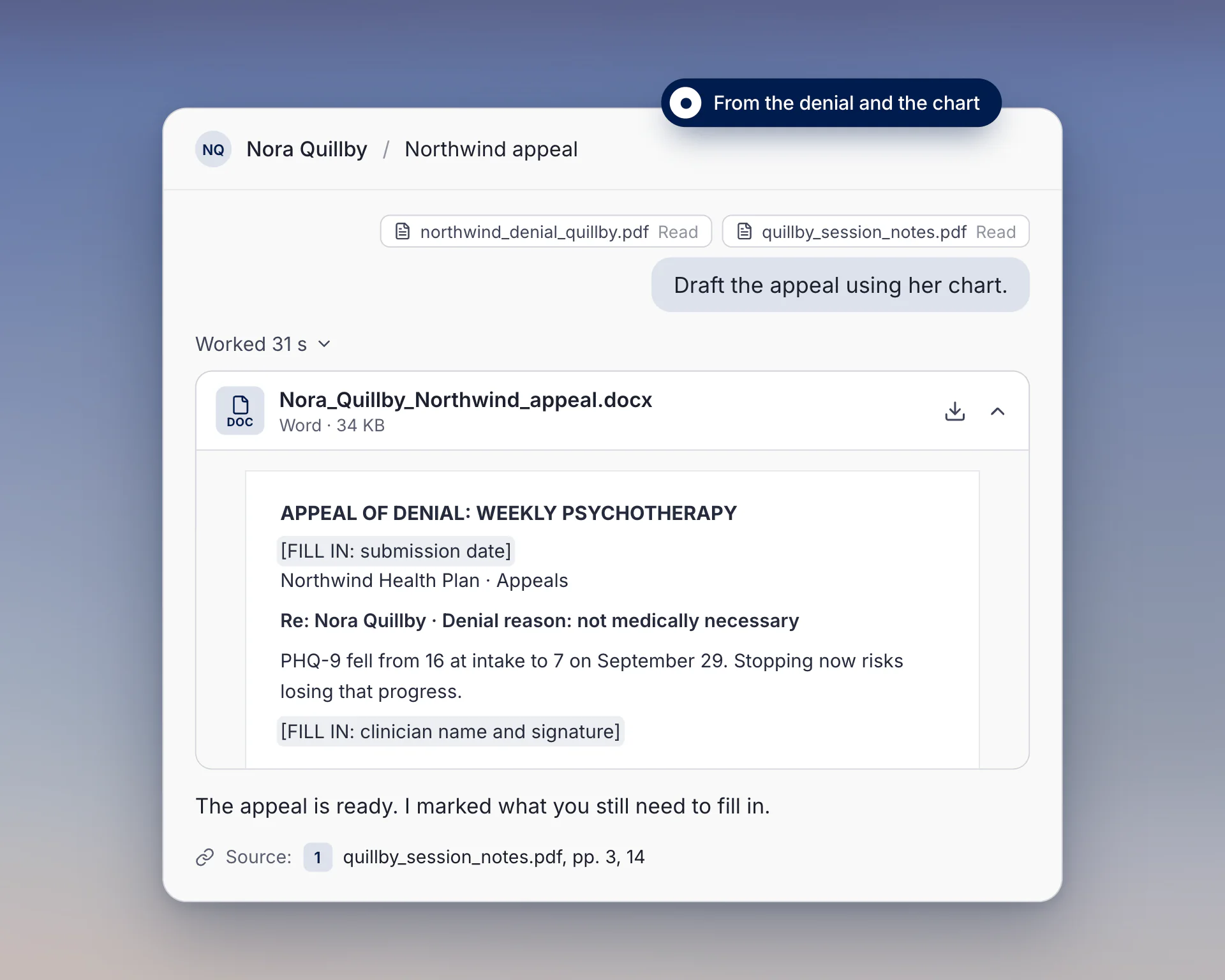
Appeals are where AI saves the most typing. The inputs already exist: the denial letter and the chart notes for the visit. The draft has to quote the denial reason, answer it with what the notes document, and leave gaps where the chart is silent. Here is a synthetic example of what goes in and what comes out.
What the denial letter said
Claim for weekly psychotherapy, date of service September 29. Denied, CO-50. Services not deemed medically necessary. Documentation does not support continued treatment at this frequency.
What the draft appeal said
The important line is the last one. A good appeal drafter does not invent a score, a date, or a prior treatment to make the case stronger. It marks the gap. The billing team or clinician fills it from the record or leaves it out.
A/R Review
Accounts receivable aging reports answer one question: who owes us what, and for how long. AI helps by reading the export and answering follow-up questions in plain language. Which payer has the most claims over 90 days? Which of those were denied versus never answered? Which providers' claims age fastest? Each answer comes back as a table you can check against the file.
A Week of AI-Assisted Billing
Features are easier to judge in a real week. Here is how a fictional billing company that serves four small practices might use AI across five days. Every name and number is synthetic.
| Day | Task | What AI does | What the team does |
|---|---|---|---|
| Monday | Monthly denials review for Practice A | Groups 412 denials by payer and reason, shows the change from last month | Picks the two reasons to fix with the practice |
| Tuesday | Appeals for medical necessity denials | Drafts eight appeals from denial letters and visit notes, marks gaps | Checks each fact, gets clinician signatures |
| Wednesday | A/R over 90 days for Practice B | Answers which payers hold the oldest balances and which claims never got a response | Calls the two payers with the most stalled claims |
| Thursday | Prior authorization support letters | Pulls the chart facts that match the payer's criteria, with dates | Submits through the payer portal |
| Friday | Client report | Turns the week's exports into a summary table and chart | Writes the recommendations and sends the report |
Look at the right-hand column. Every decision, call, submission, and signature stays with a person. What moved to AI is the reading and the first draft. That is where the hours were.
The same week shows where review time goes. Eight appeal drafts still need eight careful reads. A team that plans for that review gets the benefit. A team that does not ends up with a pile of drafts nobody has checked.
What AI Does Not Do in Billing Yet
Some vendors promise end-to-end automation. For a small practice, the safer assumption is that a person stays responsible for every step that touches the payer or the code set.
- Submitting claims runs through your billing system and clearinghouse, with their own edits and audit trail.
- Assigning codes needs a certified coder or the clinician to approve each one, because the code is a claim about the service.
- Deciding to write off a balance is a financial and compliance decision.
- Calls that need negotiation or a peer-to-peer review still need a person.
- Interpreting a payer contract is legal work, not summarization.
ClinicFrame stays on the reading and drafting side of that line. It does not submit claims, bill insurers, assign billing codes, or connect to a clearinghouse, billing system, or EHR. It analyzes the files your team exports and drafts appeals from the documents you upload.
Appeals are worth the effort when the denial is wrong. A KFF analysis of Medicare Advantage prior authorization found that only 11.5% of denials in 2024 were appealed, and 80.7% of those appeals were fully or partly overturned. Prior authorization denials are not the same as claim denials, but the lesson carries. Many denials go unchallenged because nobody has time to write the letter.
Coding Suggestions and Where They Belong
Coding is the billing task vendors most like to automate, and the one with the most risk. A code is a statement to the payer about what was done and why. If the note does not support it, the claim is wrong, whether a person or a model picked it.
Some products suggest ICD-10 and CPT codes from the finished note. That can help a coder work faster, especially on routine visits. It works best under three conditions. The suggestion shows which sentence in the note supports each code. A certified coder or the clinician approves every code before submission. And the practice audits a sample of AI-suggested codes each month, the same way it would audit a new coder.
Watch for one pattern in particular. A tool that consistently suggests higher-level visit codes than your team used before is either catching undercoding or creating overcoding risk. Only an audit against the notes tells you which. Payers notice shifts in coding patterns, and the practice, not the vendor, answers for them.
ClinicFrame does not assign billing codes. Its role in billing is the documents and exports around the claim: reading, sorting, and drafting.
Why Billing Data Needs a BAA
Billing teams sometimes treat their files as financial data. They are also health data. A denials export lists patients, dates of service, and diagnosis codes. A denial letter names the service and the reason. An appeal packet includes the chart notes. All of it is protected health information under HIPAA.
That has a practical consequence. Any AI tool that sees those files is a business associate and must sign a Business Associate Agreement. Consumer chat apps do not sign one on their standard plans. Stripping the files first is slow and often incomplete, because dates, rare diagnoses, and claim numbers can still identify a patient.
ClinicFrame signs a BAA with every account, Free included. It encrypts data in transit and at rest and does not use patient content to train AI models. Spreadsheet calculations run in an isolated environment for each chat, with your files read-only. Billing teams can upload denials, A/R exports, and chart notes as they are.
On paid plans, your biller and front desk can work in your account as admin staff seats at no extra cost, under the same BAA. That keeps billing work inside the agreement instead of in a personal chat account.
How to Read a Vendor's Numbers
AI billing vendors publish impressive figures: higher overturn rates, minutes saved per appeal, fewer denials. Some are solid. All of them are the vendor's own measurement. Before one shapes your decision, ask five questions about it.
- What was the baseline? A 40% improvement on a team that appealed almost nothing is a different story from one on a mature team.
- Who was measured? A large health system's results may not carry over to a practice with one biller.
- Over what period? Early months of a pilot often look better than month twelve.
- Which denials? Medical necessity, authorization, and coding denials respond differently to appeals.
- Net of what? Minutes saved per appeal should subtract the minutes spent reviewing the draft.
The best number is the one you measure yourself. Two weeks of your own denials, worked with and without AI, tell you more than any case study.
Start With One Workflow
The fastest way to learn whether AI helps your billing team is a two-week pilot on one workflow. Pick the one with the most manual reading.
- Choose either the monthly denials review or appeal drafting. Not both.
- Confirm the BAA is signed before any real export or letter goes in.
- For denials, upload last month's export and ask the questions you answer by hand today. Compare the numbers to your own report.
- For appeals, take five recent denials and draft each with AI from the denial letter and chart notes. Time the review, not only the draft.
- Log every correction. A wrong number, a missing fact, or an invented fact each means something different.
- Keep submission, coding, and signatures exactly where they are.
At the end of two weeks you will know the real number that matters: hours saved per denial worked, net of review. See how ClinicFrame handles both workflows on our page about AI for medical billing, and work through the method in our guide to denial management.
If you are comparing products, our list of AI medical billing software covers claims platforms, denial analytics, and appeal tools side by side, with what each vendor publishes about price and BAA coverage.