01
BAA on every plan
Signed with every account, Free included.

Denials, A/R exports, and appeal packets are full of patient data, and most AI tools do not sign a BAA, so the files never go in. ClinicFrame signs one with every account, so you upload them as they are and get the export analyzed and the appeal drafted.
Signed BAA on every plan · Same file, same numbers · No claims submitted or codes assigned
HIPAA requires a Business Associate Agreement with any vendor that handles PHI for you, and most AI tools do not sign one. ClinicFrame signs one with every account, Free included, so denials, A/R exports, and records go in without stripping patient data.
Signed with every account, Free included.
Calculations on your files run as code in an isolated environment.
In transit with TLS and at rest.
ClinicFrame does not use patient content to train AI models.
Read how ClinicFrame protects patient dataHow we protect patient data →
Deterministic data analysis
ClinicFrame reads your Excel and CSV exports and runs the calculation as code, so the same file gives the same numbers every time. For appeals, it drafts the letter from the denial letter and your chart notes.
See how HIPAA compliant data analysis works on spreadsheets with PHI.
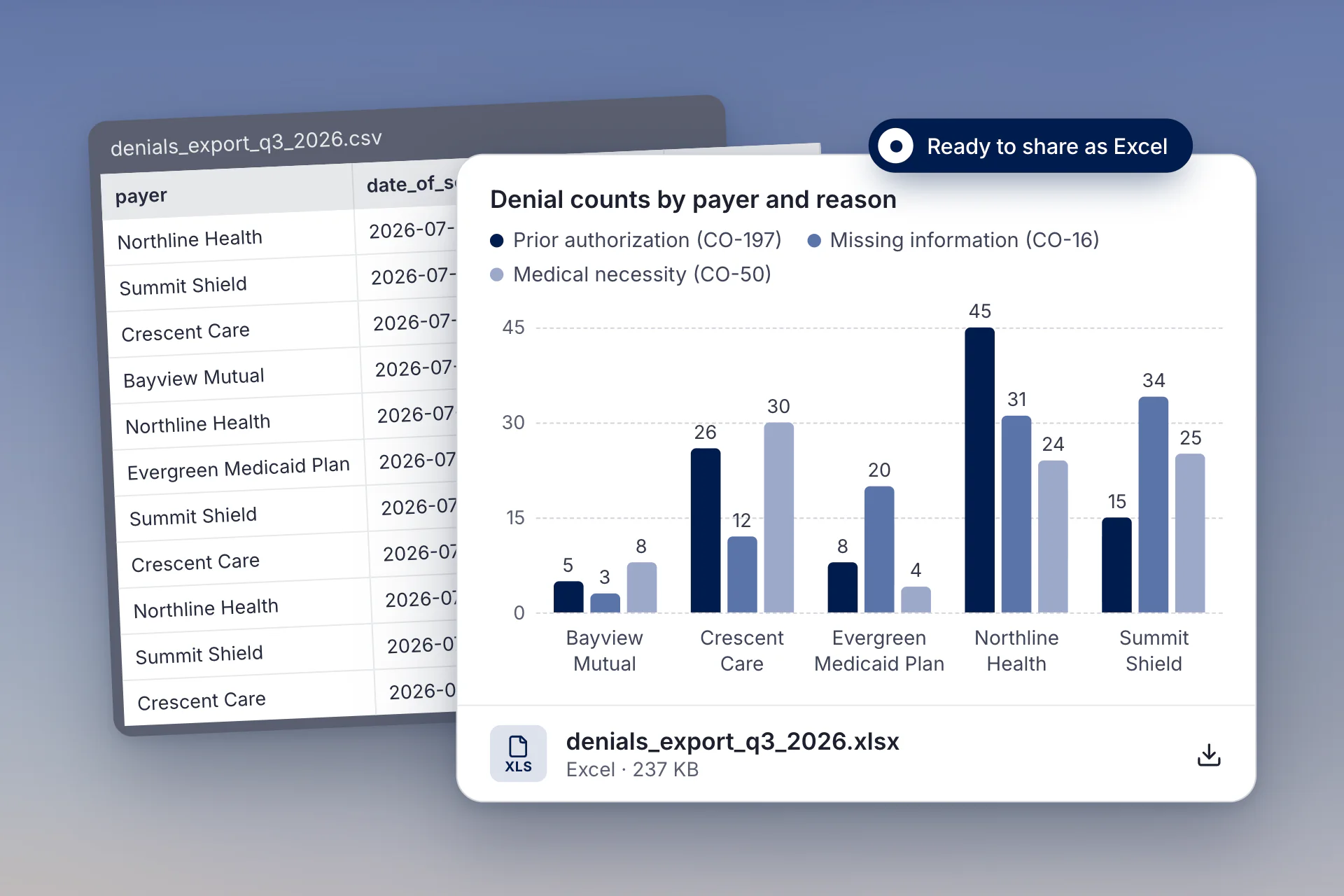
Upload the export your billing system already produces and ask in plain language. ClinicFrame works out the numbers with code, so every figure traces back to rows in your file.
You get the answer in the conversation and as an Excel file your team can filter, share, and check.
denials_q3.csv, exported from your billing system
Top payers by denied amount. Payer A, Payer C, and Payer B account for most of the denied dollars. Computed from the file
Top denial reasons. Missing prior authorization and medical necessity lead for Payer A. Computed from the file
Trend. Medical necessity denials rose month over month for Payer C. Chart included
Output. denials_by_payer_and_reason.xlsx, ready to filter and share
Start from your own documents. ClinicFrame drafts the appeal from the denial letter and the chart notes, and your team reviews it.
Add the denial letter and the chart notes for the visit in question.
Ask ClinicFrame to draft the appeal. It quotes the denial reason and answers it with what the notes document.
Check every claim against the chart, fill the marked gaps, and have the right person sign.
No. ClinicFrame works on the files and documents behind a claim. It is not a billing system and does not replace yours.
Yes. Watch ClinicFrame read a denial letter and the chart notes, draft the appeal, and mark what the records do not show.
“I stopped chasing providers for missing details. The notes come in complete and accurate.”

Rating from G2 as of November 2026.
Try it for freeStraight answers for billing and revenue cycle teams.
Only to one that signs a Business Associate Agreement. ClinicFrame signs a BAA with every account, Free included, encrypts data in transit and at rest, and does not use patient content to train AI models, so your team can upload denial letters, chart notes, and A/R exports as they are.
ClinicFrame drafts an appeal from the denial letter and the chart notes you upload. It quotes the denial reason and answers it with what the notes document, and anything the records do not show stays marked for your team. ClinicFrame does not submit claims, assign codes, or connect to a clearinghouse.
Yes. Upload a denials or accounts receivable export as an Excel or CSV file and ask your question. ClinicFrame runs the calculation as code over the file and returns the result as a table, a chart, or an Excel file, so the same file gives the same numbers every time.
It means ClinicFrame does not estimate the numbers. It writes and runs code over your Excel or CSV file, in an isolated environment, and returns the exact result. You can re-run it, open the output file, and check any figure against your own export.
No. ClinicFrame does not submit claims, bill insurers, assign billing codes, or connect to a clearinghouse, a billing system, or an EHR. It analyzes the files your team exports and drafts appeals from the documents you upload.
ClinicFrame publishes per-user prices on the pricing page, and data analysis works on every plan. For a billing or revenue cycle team, pricing depends on the number of seats and Enterprise terms. Book a demo for a quote.
Tell us which exports you work with and what you need to answer. Someone from the team writes back.
Updated