
Data analysis
HIPAA compliant data analysis for spreadsheets with PHI
Plenty of AI tools can run the numbers. Few sign a BAA, so the file with patient data never goes in. ClinicFrame signs one with every account, so you upload the export as it is, PHI included, and get every row analyzed in Python.
Free plan. No credit card needed.
- BAA on every plan, Free included
- Every row counted
- Rated 4.8 out of 5 on G2
Upload the file as it is, PHI included
HIPAA requires a Business Associate Agreement with any vendor that handles PHI for you. ClinicFrame signs one with every account, Free included, so the export goes in without stripping a single column.
- BAA on every planSigned with every account, Free included.
- EncryptedIn transit with TLS and at rest.
- Not used for trainingClinicFrame does not use patient content to train AI models.
- A workspace per chatThe code runs on your files inside the conversation where you uploaded them.
Self-audit
Every row accounted for
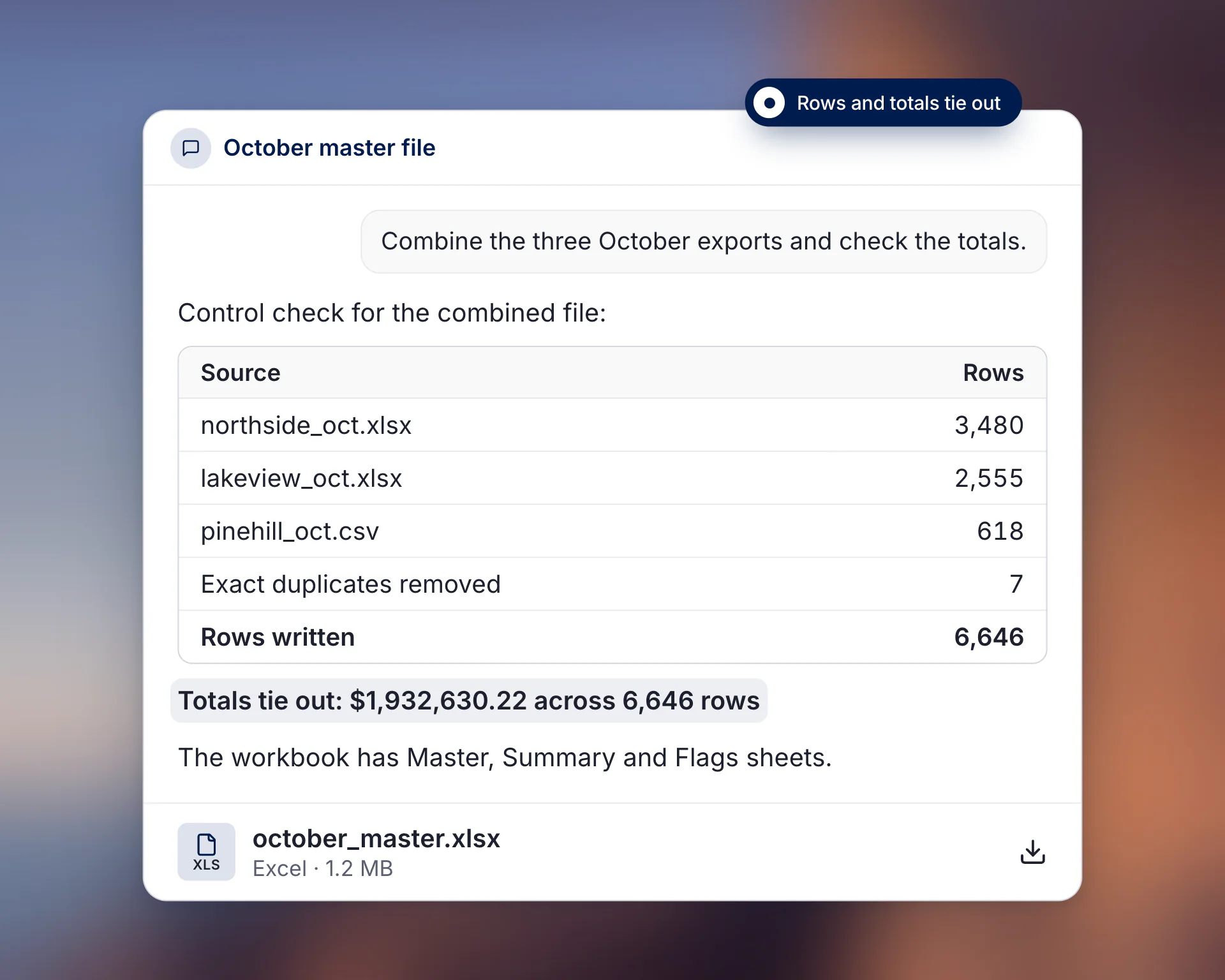
A finance report is only as good as its row count. ClinicFrame reads the whole file, then shows its work: rows read from each source, duplicates removed, rows written, and totals that tie out.
Check the audit before the numbers go to payroll, to a client, or to a quote. If something does not add up, it is there in the summary, not buried in tab four.
From raw export to finished workbook
Upload the exports
Add every Excel and CSV file, plus a sample of the workbook you want back.
Describe the output
Name the tabs, the columns, and the rules: how to match rows, what to flag, what to total.
Check the audit, download
Read the row counts and the flags, then download the workbook from the chat.
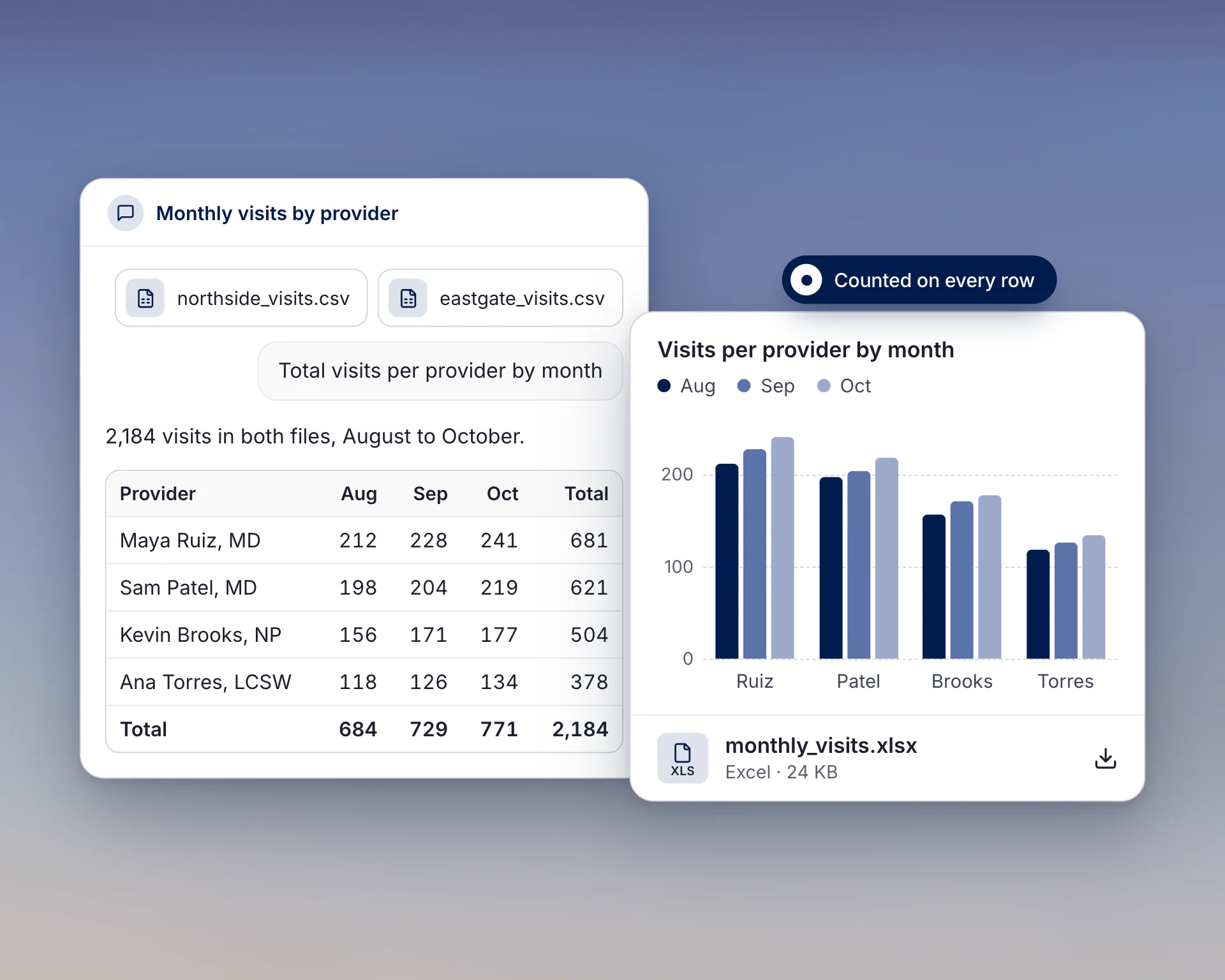
Three jobs finance and data teams bring to ClinicFrame
Each one starts with exports from other systems and ends with a file you can send.
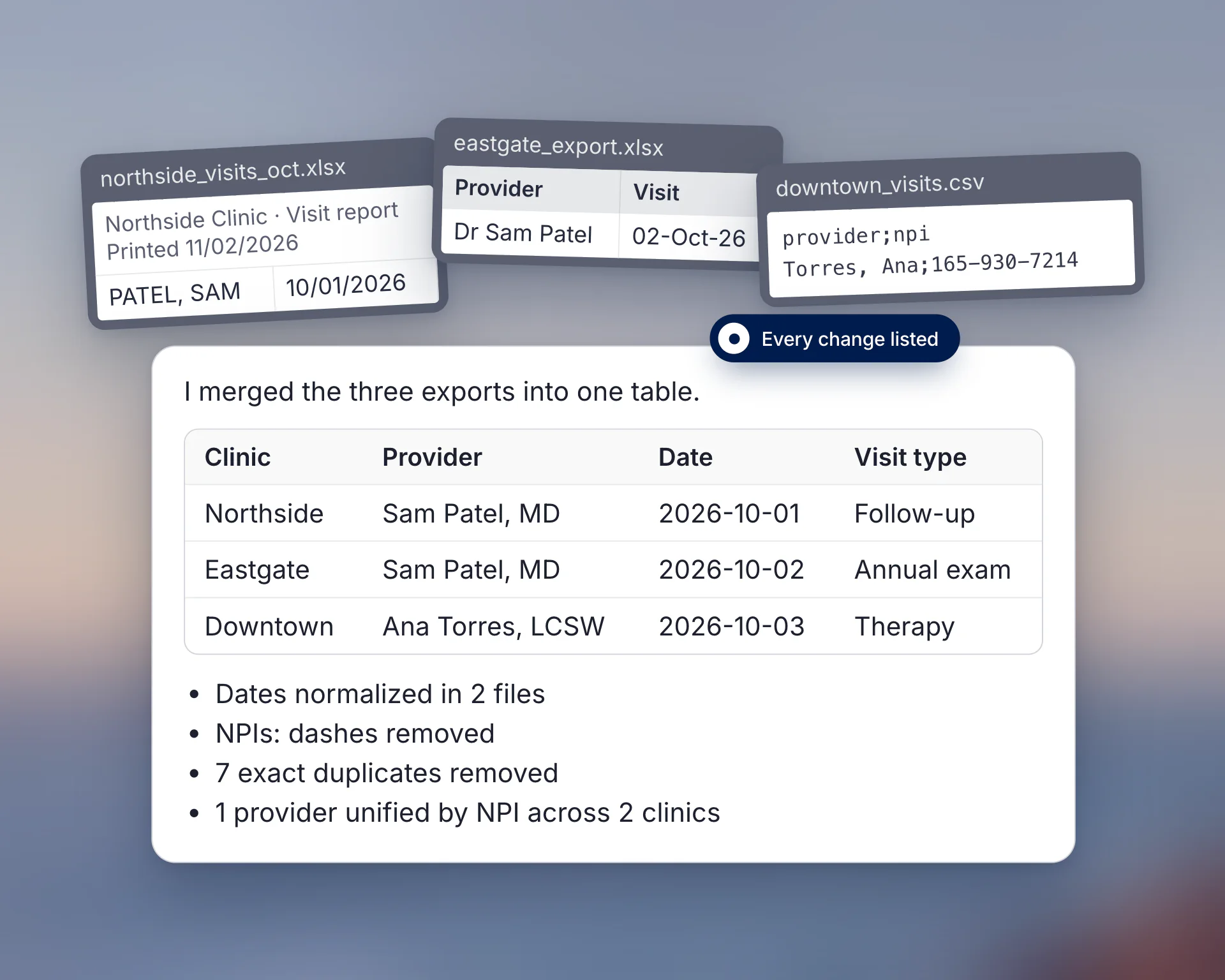
Standardize every export to your format
Each source exports its own way: report headers on top, three date formats, names split in two columns. ClinicFrame maps all of it to your template and lists every change it made.
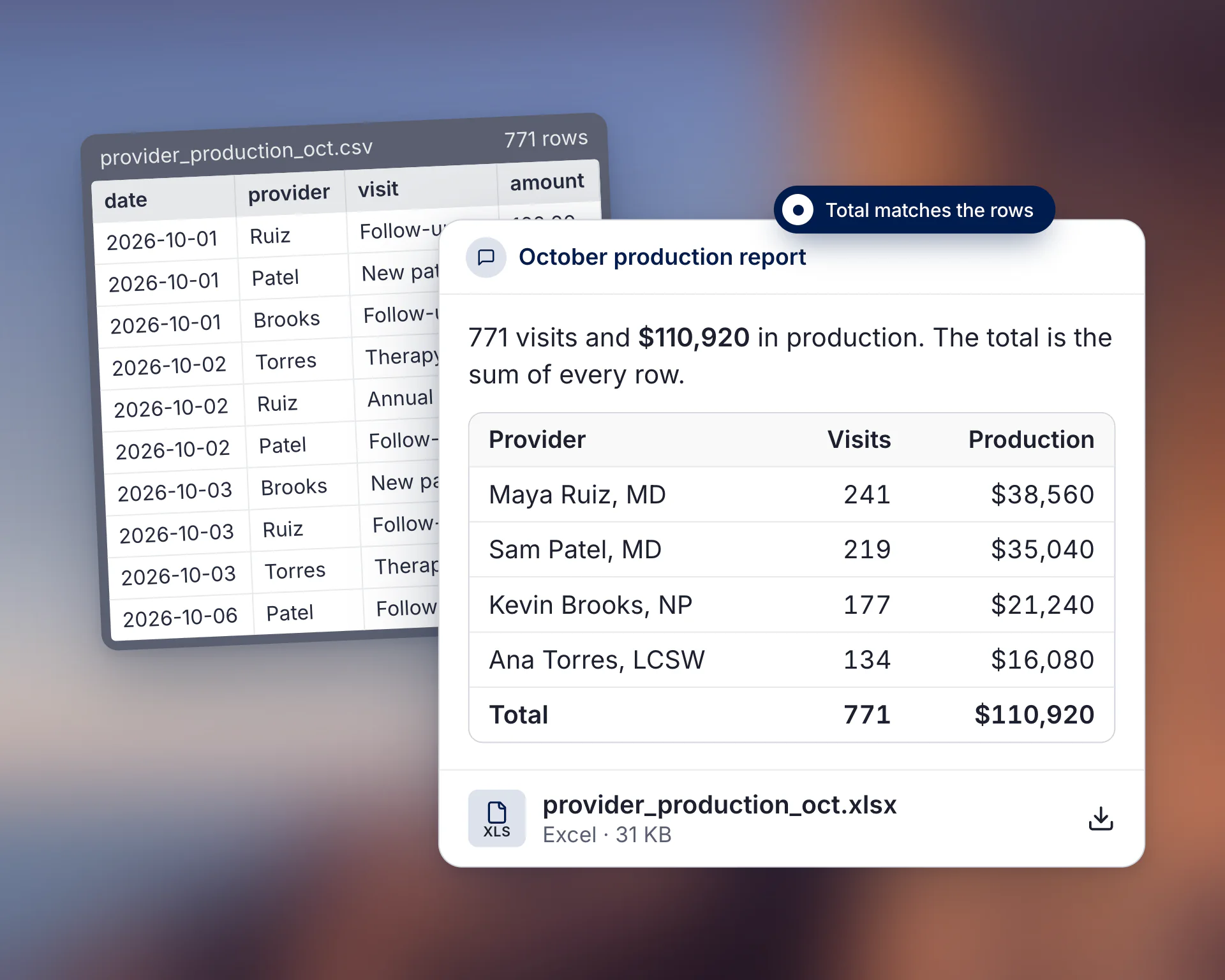
Run the monthly report on deadline
Production per provider, compensation inputs, visits by location. Same exports, same request, same calculation every month, with the total checked against the rows before payroll closes.
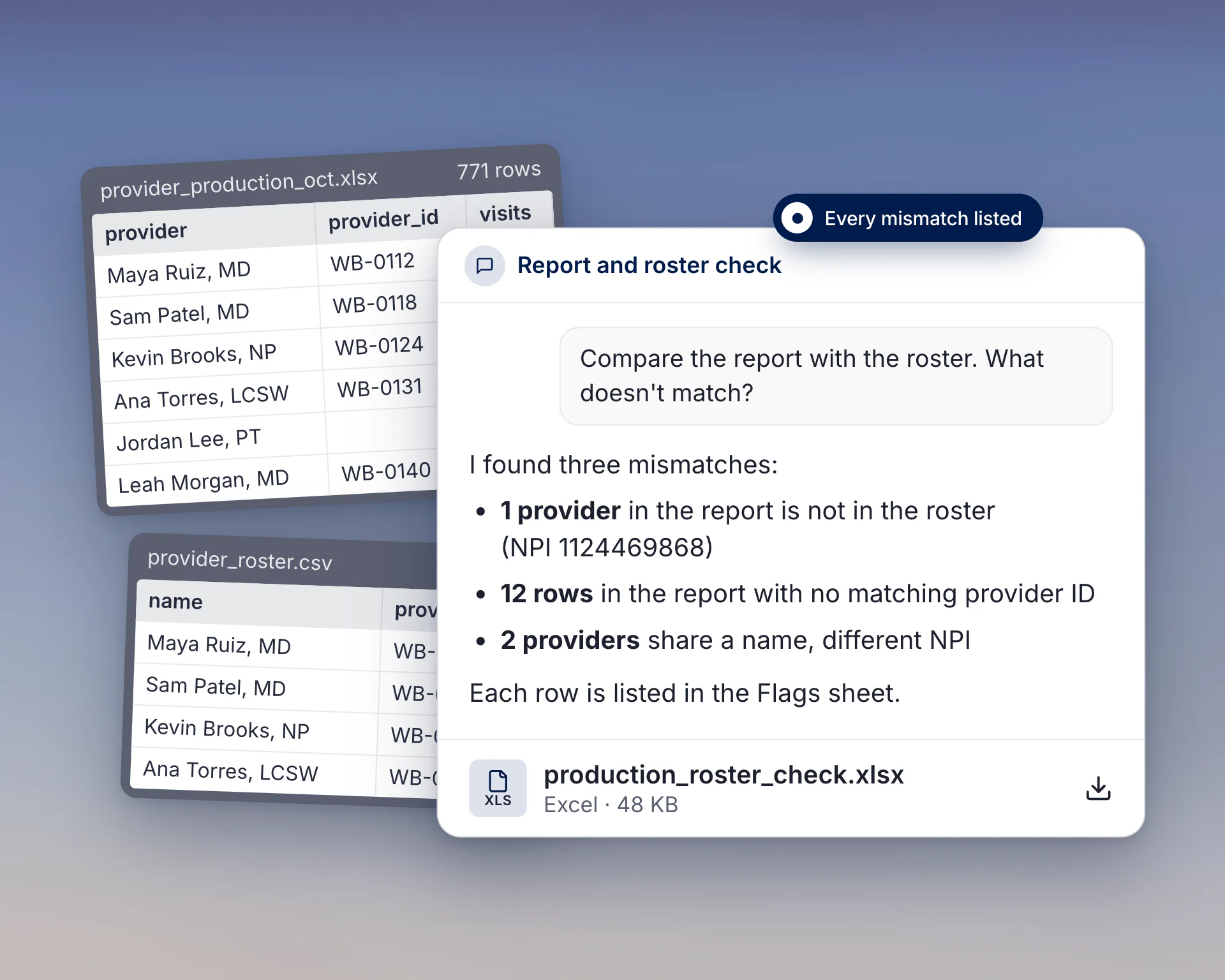
Find what doesn't match
Compare a report against a roster, or one export against another. ClinicFrame lists the rows that have no match, the IDs in one file and not the other, and the names that collide.
What clinicians say about ClinicFrame
“Before ClinicFrame, spreadsheets with PHI were a headache. Now I upload the month's exports as they are, and the totals tie out before payroll closes.”
Spreadsheet limits by plan
Data analysis works on every plan. The plan sets how large a file and how many files per request.
Basic
$27.99per user / month
$335.88 per user, billed yearly
- Everything in Free, plus
- Data files up to 50 MB, 100 per request
- No weekly visit limit
- No weekly chat limit
- SOAP, DAP, BIRP, and custom notes
Plus
Most complete$71.99per user / month
$863.88 per user, billed yearly
- Everything in Basic, plus
- Data files up to 50 MB, 100 per request
- Files saved to each patient
- Files up to 2,000 pages
- No monthly limit on Evidence and Think
Max
Coming soon- Everything in Plus, plus
- Your schedule and charts, read from the EHR
- Ready-made workflows for intake, referrals, and follow-up
- Priority support and guided onboarding
Ultra
Coming soon- Everything in Max, plus
- Custom connectors and your own API
- Your own workflows and scheduled routines
- Priority support with a named contact
Free includes 15 visits a week, 20 chat questions a week, 2 patients. Signed BAA, no credit card.Try it for free
Compare every plan. Need custom terms? Talk to us about Enterprise.
More of what the ClinicFrame assistant does
Each tool works over the same patient notes and files, in the same chat.
What it does
What HIPAA compliant data analysis means for a finance team
HIPAA compliant data analysis means the tool that reads your PHI works under a signed Business Associate Agreement. ClinicFrame is healthcare data analytics software that signs one with every account and analyzes the Excel and CSV files your systems already export. It writes and runs Python on every row, so counts and totals are computed, not estimated, and it returns tables, charts, and a workbook you can download. It works with the files you upload; it does not connect to your EHR or your accounting system.
It is built for the reports a finance or operations team rebuilds by hand: standardized exports, monthly reports per provider, and comparisons between files. Ask follow-up questions in the same ClinicFrame Assistant conversation.
Frequently Asked Questions
Straight answers about analyzing spreadsheets with ClinicFrame.
Can I upload spreadsheets with PHI to ClinicFrame?
Yes. HIPAA requires a Business Associate Agreement with any vendor that handles PHI for you, and ClinicFrame signs one with every account, Free included. Data is encrypted in transit and at rest, and ClinicFrame does not use patient content to train AI models. Follow your organization's policies on what you upload.
How does ClinicFrame make sure the numbers are right?
ClinicFrame writes Python and runs it on your files, so counts and totals are computed from every row instead of estimated. Ask it to audit its own work: rows read per file, rows removed and why, rows written, and totals that tie out to the source.
Can ClinicFrame return the workbook in our own format?
Yes. Upload a sample of the workbook you use and ask ClinicFrame to follow it: the same tabs, the same columns, the same order. It returns an Excel or CSV file you download from the chat.
Can we run the same report every month?
Yes. Upload the month's exports with the same request, and ClinicFrame runs the same calculation on the new rows. Keep the request and a sample of the output, and the report comes back in the same shape each time.
How large a file can ClinicFrame analyze?
Up to 50 MB per data file and 100 files per request on Basic and Plus. Free takes up to 10 MB per data file and 3 files per request. ClinicFrame reads Excel (.xlsx) and CSV.
Can the whole finance team use it?
Yes. Everyone works in the same chat, with no code to write and no API to set up. For a group, <a href="/product/teams">ClinicFrame Teams</a> puts every seat on one account and one BAA.
Extra hours aren’t supposed to follow you home.
ClinicFrame keeps them at the clinic.
Updated