
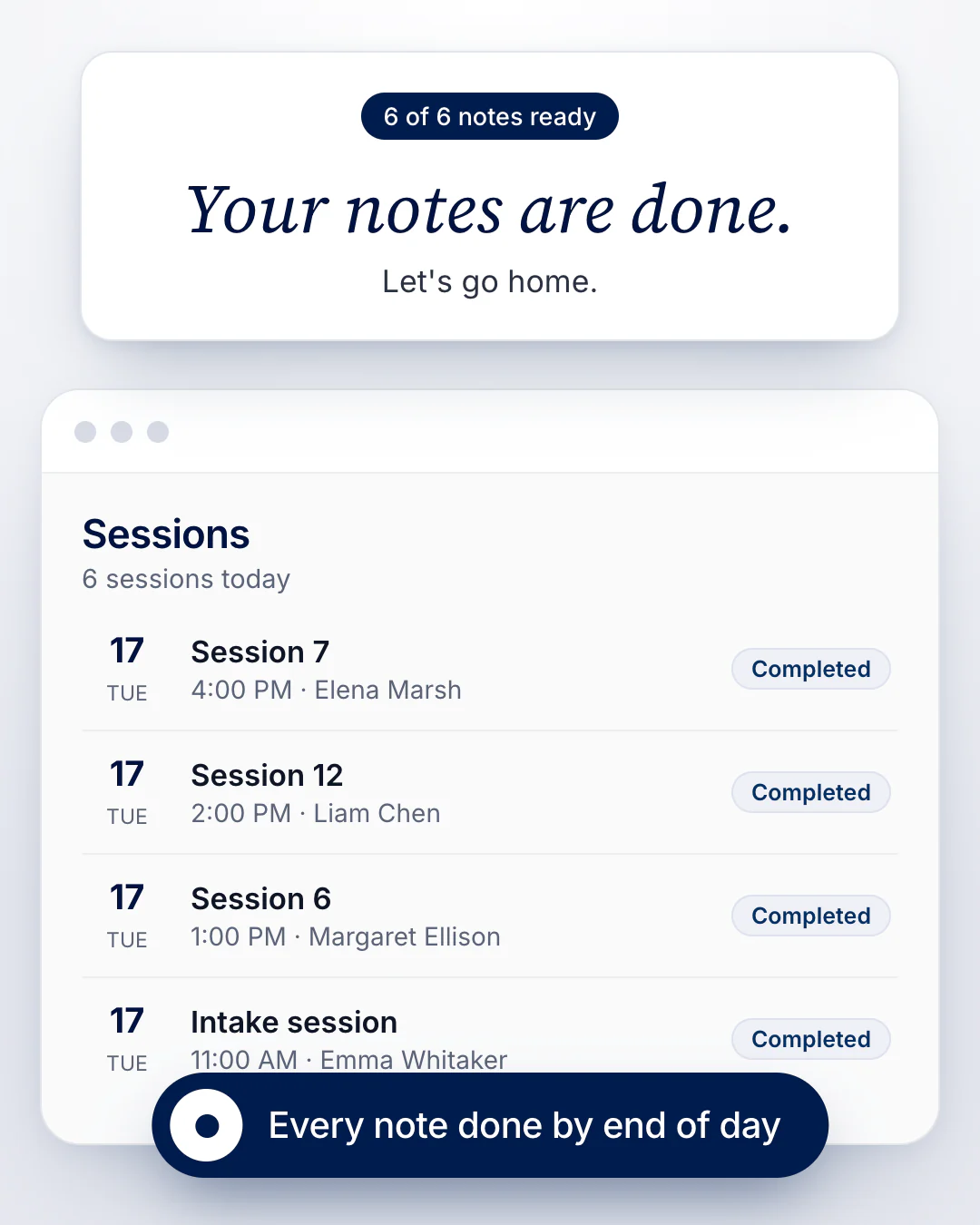
AI for therapists, from intake to treatment plan

ClinicFrame preps you before each session, writes the DAP or BIRP note after it, and drafts the treatment plan update from your notes.

Free plan · No credit card · Signed BAA on every plan

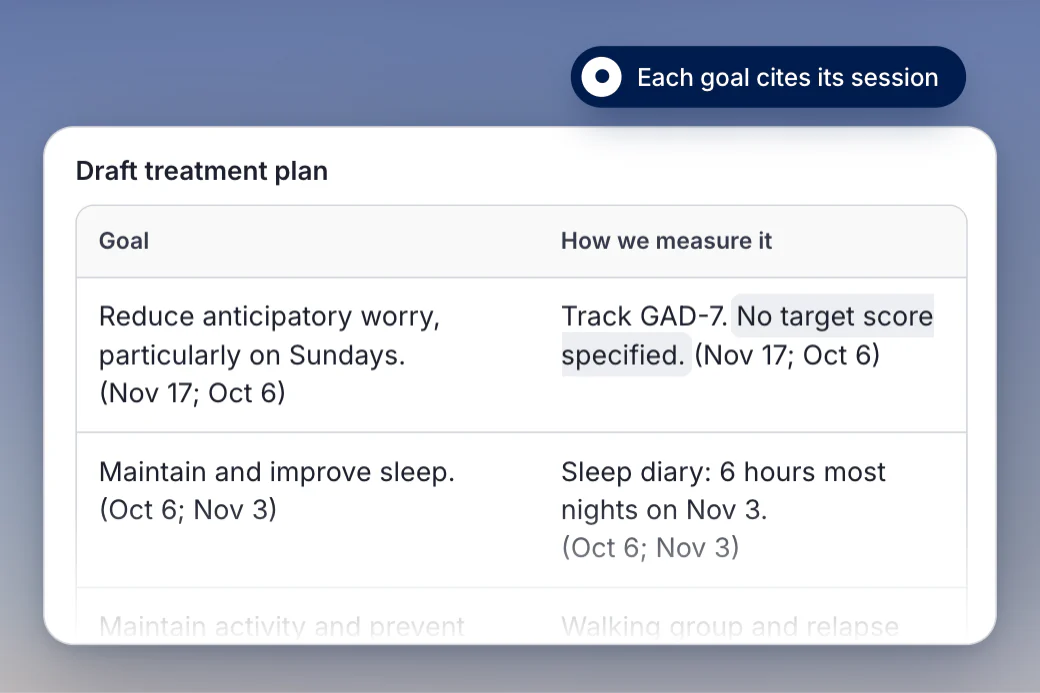
A synthetic client's DAP notes in ClinicFrame next to her draft treatment plan, with goals for Sunday-evening worry, sleep, and relapse prevention, each citing its session

A therapist's day in three moments

One synthetic client, Elena, through one session. Each moment works over her notes and files in ClinicFrame.

  • Before the session

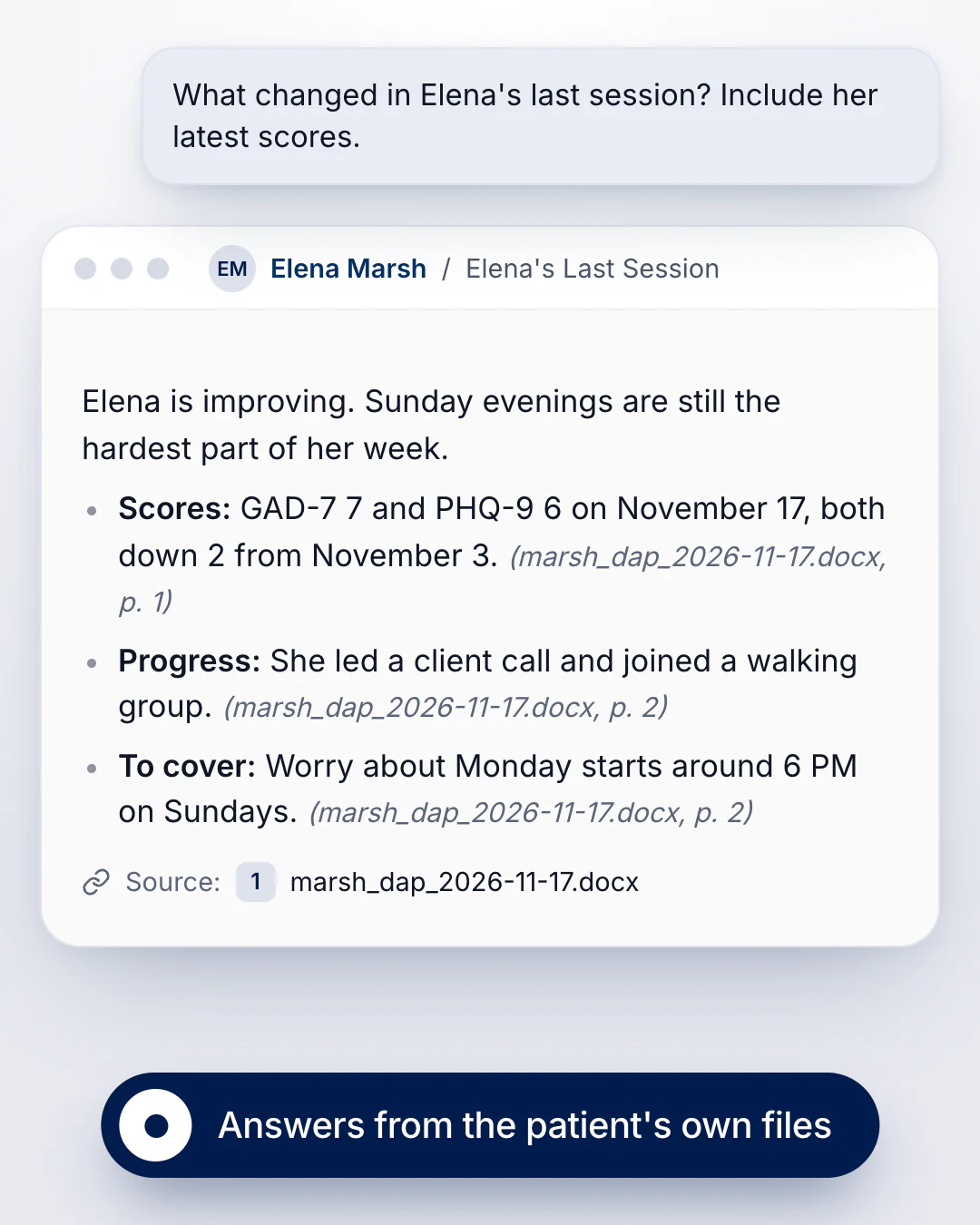
    Ask for a pre-visit brief. ClinicFrame lists what changed, the latest GAD-7 and PHQ-9, and what to cover, each with its source. See pre-charting, or records summary for a new client's intake packet.

  • During the session

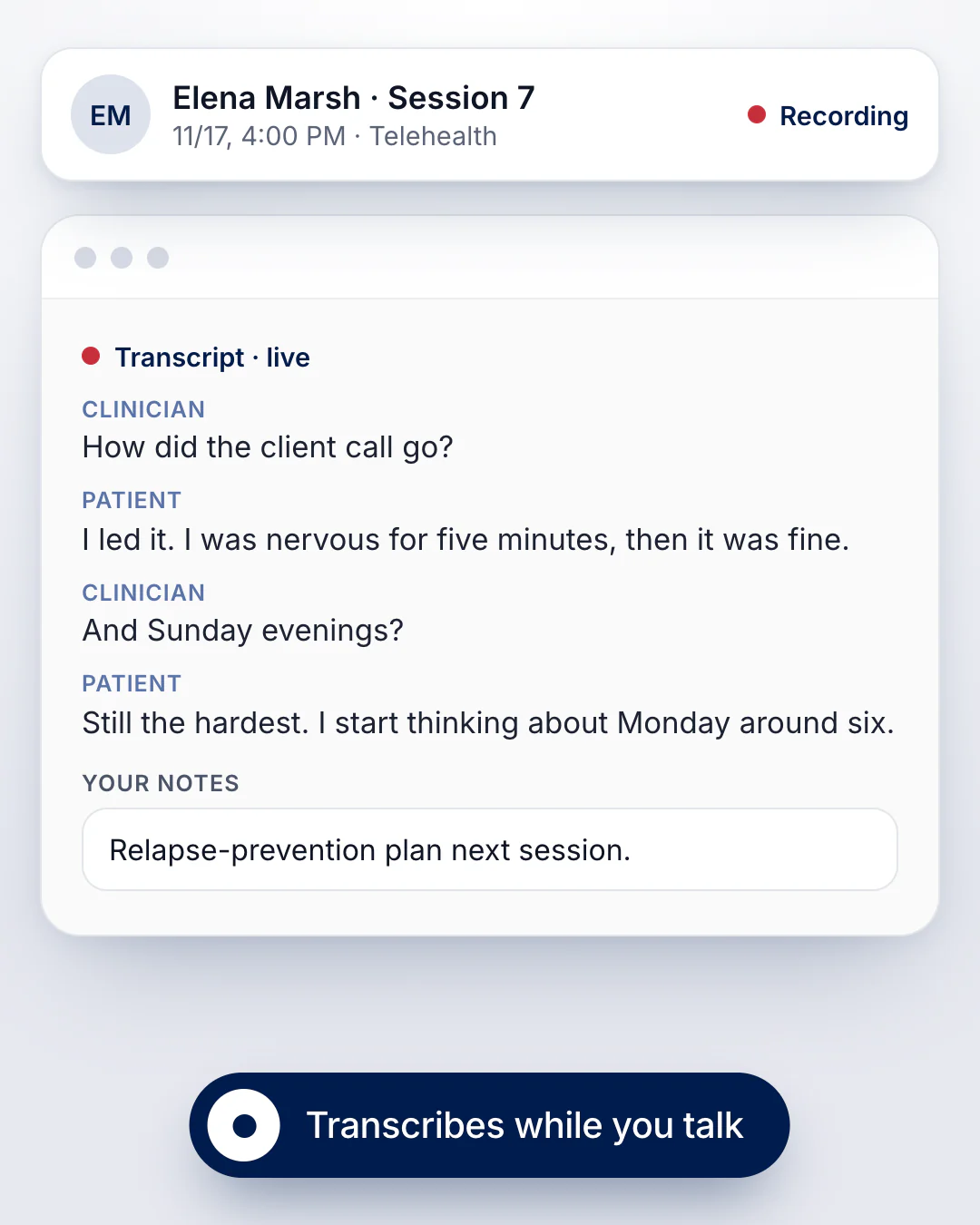
    Record in the room, or share the telehealth tab and no bot joins the call. To keep the session unrecorded, dictate it after the client leaves. See the AI scribe and dictation.

  • After the session

    The DAP or BIRP note is ready to review and sign. From the same notes, ClinicFrame drafts treatment plan updates and letters, each point tied to its session. See treatment plans and letters.

The note

Your note in DAP, BIRP, or SOAP

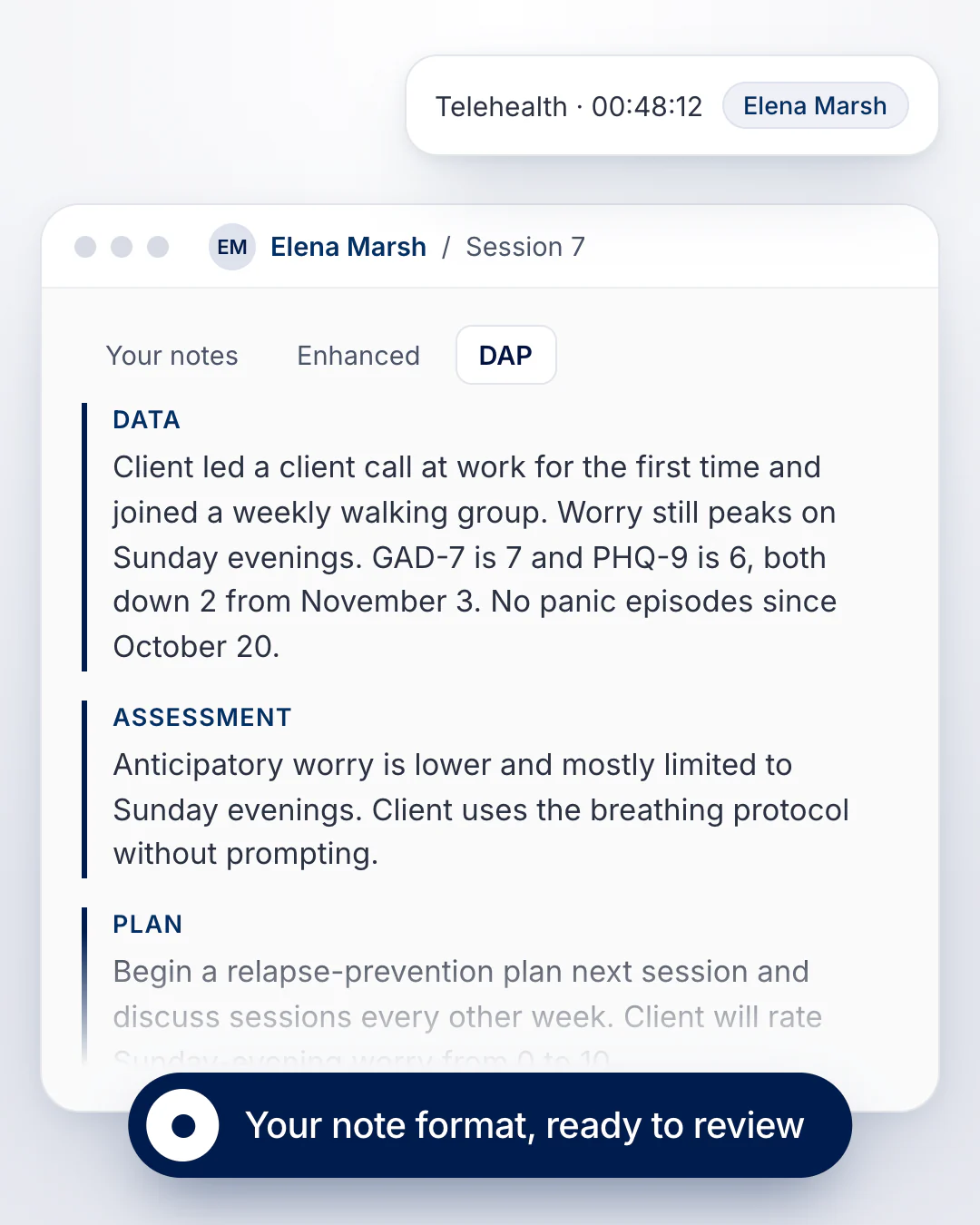
This is Elena's November 17 session in DAP. Read every line, sign it, then copy it into your EHR or export a PDF. Recording, dictation, and every format are on the AI scribe for therapists page.

Writing in another format? Start from the GIRP note template or the case note template.

Showing: the draft

Synthetic example. Not a real patient.

DAP progress note

Synthetic client, individual therapy, 50 minutes

Data

Client led a client call at work for the first time and joined a weekly walking group. Worry still peaks on Sunday evenings.

GAD-7 is 7 and PHQ-9 is 6, both down 2 from November 3. No panic episodes since October 20.

Assessment

Anticipatory worry is lower and mostly limited to Sunday evenings. Client uses the breathing protocol without prompting.

Plan

Begin a relapse-prevention plan next session and discuss sessions every other week. Client will rate Sunday-evening worry from 0 to 10.

Measurement-based care

Track PHQ-9 and GAD-7 across sessions

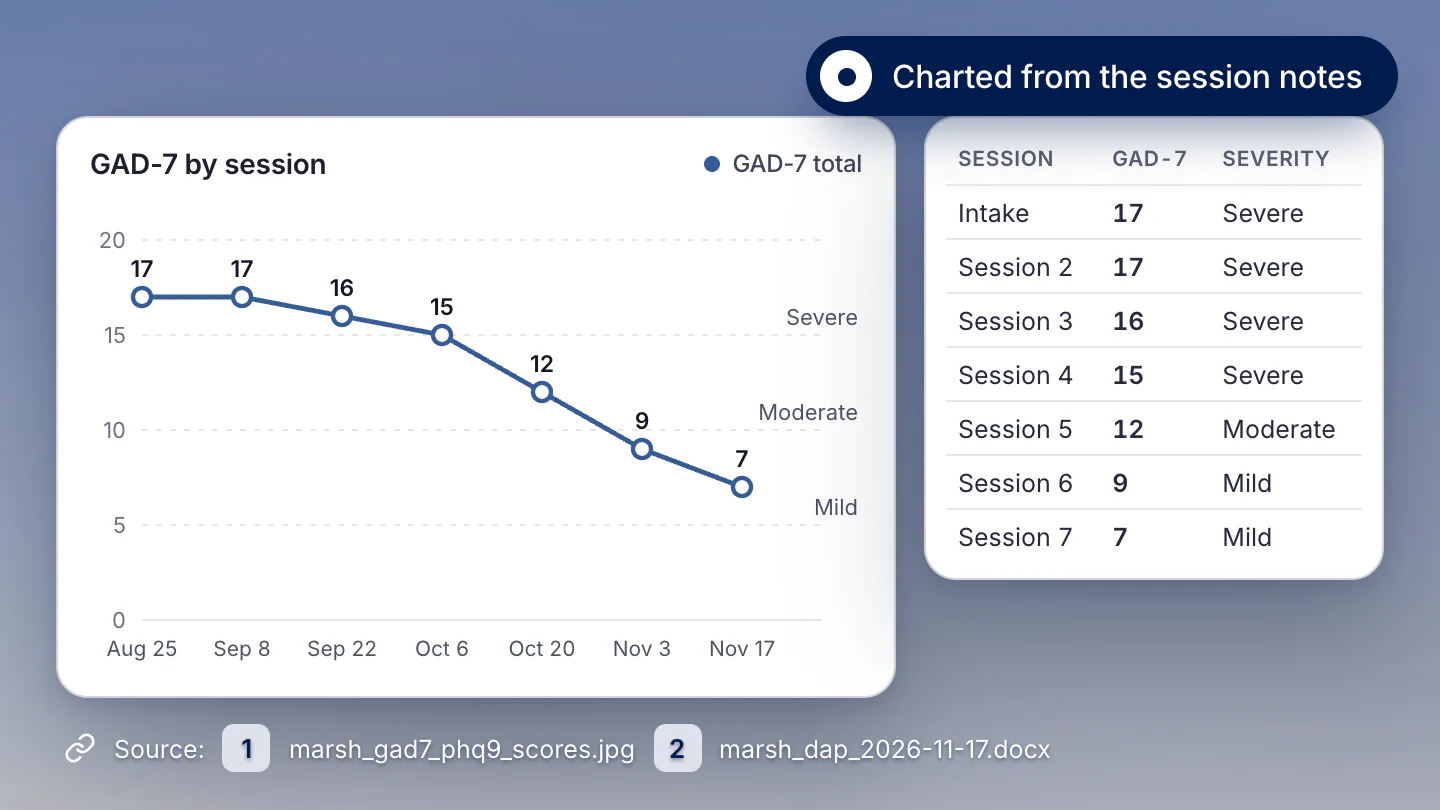
Ask ClinicFrame for a client's scores over time. It returns a table and a chart of the scores you documented, with the note or file each one came from.

Bring the trend into the session or into a plan review. ClinicFrame reads the scores in your records. It does not administer the questionnaire or interpret the result. See what else the AI medical assistant answers.

ClinicFrame chat with a synthetic client's GAD-7 scores across seven sessions as a table and a chart against the severity cutoffs, with the source files cited
GAD-7 by session for a synthetic client, from intake to November 17.

Update the treatment plan from your notes

When a plan review comes due, ask ClinicFrame to draft the update from the sessions since the last plan. Each goal and score cites its session. Anything your notes do not say stays marked for you to fill.

The plan records what you decided, and ClinicFrame does not choose goals or treatments. A letter to the client's psychiatrist or primary care doctor comes from the same notes, as a Word file. See treatment plans and letters, or start on paper with the treatment plan template.

What goes in

Your notes since the last plan

  • Aug 25: intake, GAD-7 17, worry about work most days.
  • Oct 6: goal set to reduce Sunday-evening worry.
  • Oct 20: panic episode before a presentation, breathing protocol.
  • Nov 17: GAD-7 7, joined a walking group.
Treatment plan updateDraft

Goal. Reduce anticipatory worry, particularly on Sunday evenings. Sessions, Oct 6 and Nov 17

Progress. GAD-7 from 17 at intake to 7. No panic episodes since Oct 20. Intake and session, Nov 17

Interventions. Breathing protocol for panic. Weekly walking group for activity. Sessions, Oct 20 and Nov 17

Target date. Not in the notes
Plan review after 8 sessions.. Synthetic example. Not a real patient.

ClinicFrame OS

One visit note, and the work that follows it

ClinicFrame OS is the engine of ClinicFrame. It connects the tools the practice already uses, like Google Calendar, Google Drive, and Dropbox. Each visit sets the next tasks in motion, and clinicians, staff, and AI pass the work along in one place, under one signed BAA.

Comparing options first? Read our guide to the best AI tools for therapists.

Elena's November 17 note updates her plan review: GAD-7 from 17 to 7, each point tied to its visit.

Treatment plans and letters

A letter to her primary care doctor comes from the same notes, as a Word file you edit and sign.

Notes, scores, and uploaded files sit in one workspace per client. On Plus, her files stay saved for every later question.

Before December 1, a brief lists what changed, her latest scores, and what to cover, each with its source.

Pre-charting

Google Calendar lists the day's visits. Google Drive and Dropbox let ClinicFrame read the files you keep there. Missing a tool? Request a connector from Settings and say what you'd use it for. Requests decide what ClinicFrame connects next.

What clinicians say about ClinicFrame

“I do not record my patients. I talk the visit through after, and the note is done just as fast.”

Dana Whitfield, LCSWOutpatient behavioral health

Dictate the note instead of recording the session

Choose Dictation, talk the session through after the client leaves, and ClinicFrame writes the note in your format. Only your voice is recorded.

  • Only your voiceDictation records you narrating the session after the client leaves.
  • Audio discardedSession audio is processed and discarded. The transcript and the note stay in your account.
  • BAA on every planSigned with every account, Free included.
  • Not used for trainingClinicFrame does not use client content to train AI models.
Read how ClinicFrame protects patient dataHow we protect patient data

Group practices

Put your group practice on one account

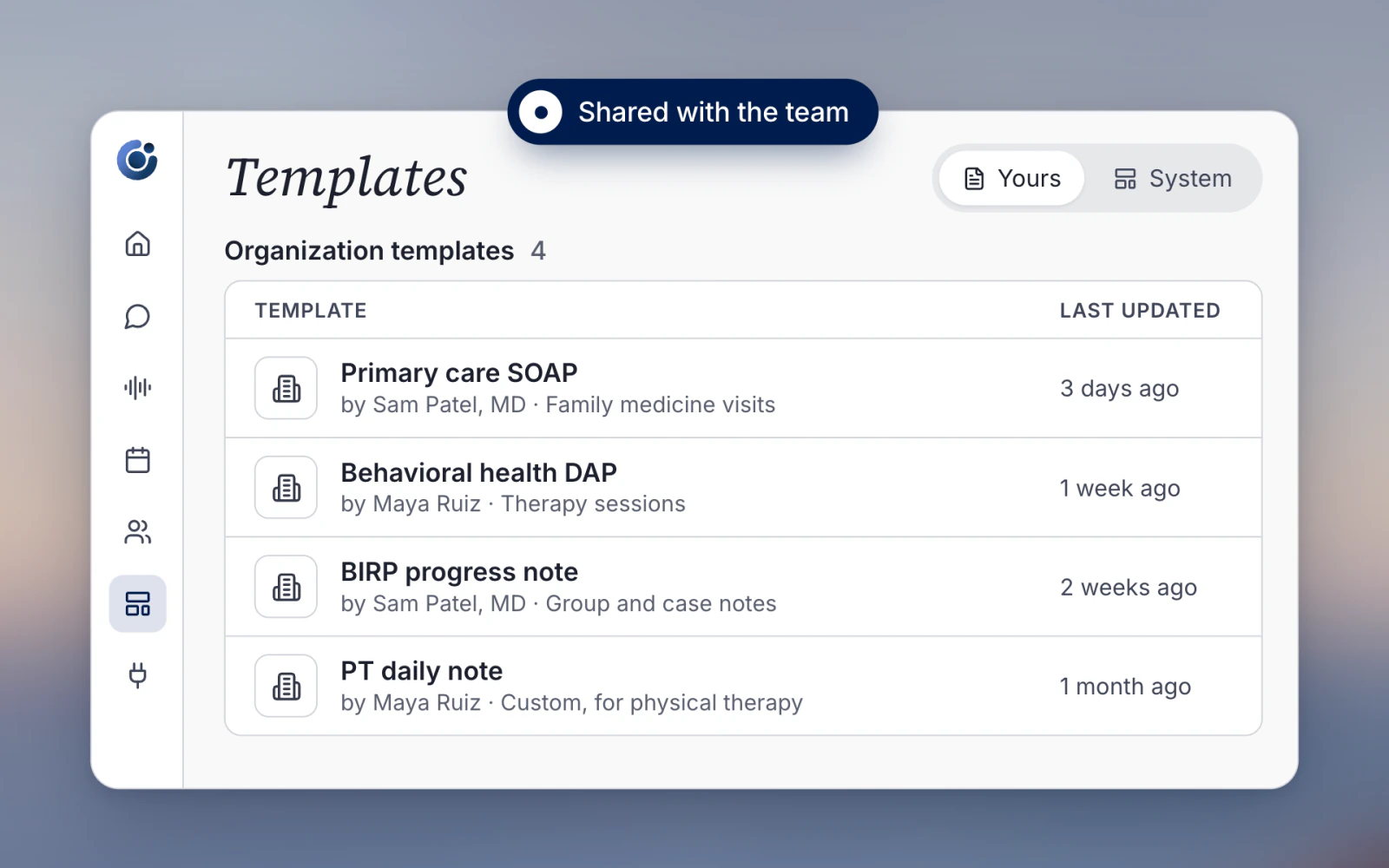
Share your DAP or BIRP template with every therapist, work on the same clients, and keep one BAA for the practice. Each note stays editable only by the therapist who wrote it.

Seats are billed per therapist. See ClinicFrame Teams, or ClinicFrame for clinics for a larger practice.

ClinicFrame organization templates shared with the team, including a behavioral health DAP and a BIRP progress note
Templates shared with the practice, including DAP and BIRP.
Pricing

Pick the plan for your caseload

Free is enough to try ClinicFrame on real sessions. A full caseload fits Basic.

  • Basic

    $27.99per user / month

    $335.88 per user, billed yearly

    • Everything in Free, plus
    • No limit on clients or weekly sessions
    • No weekly visit limit
    • No weekly chat limit
    • SOAP, DAP, BIRP, and custom notes
    Choose Basic
  • Plus

    Most complete

    $71.99per user / month

    $863.88 per user, billed yearly

    • Everything in Basic, plus
    • Client files saved, up to 2,000 pages
    • Files saved to each patient
    • No monthly limit on Evidence and Think
    • Visits up to 6 hours
    Choose Plus
  • Max

    Coming soon
    • Everything in Plus, plus
    • Your schedule and charts, read from the EHR
    • Ready-made workflows for intake, referrals, and follow-up
    • Priority support and guided onboarding
    Join the waitlist
  • Ultra

    Coming soon
    • Everything in Max, plus
    • Custom connectors and your own API
    • Your own workflows and scheduled routines
    • Priority support with a named contact
    Join the waitlist

Free includes 15 visits a week, 20 chat questions a week, 2 patients. Signed BAA, no credit card.Try it for free

DAP, BIRP, and SOAP notes on every plan. Compare every plan. Need custom terms? Talk to us about Enterprise.

FAQs

Frequently Asked Questions

Straight answers for therapists about notes, recording, and client data.

What AI writes DAP and BIRP notes for therapists?

ClinicFrame does. It writes DAP, BIRP, and SOAP notes from a session recorded in the room, a telehealth call, or your dictation after the session. You can also build your own template from a note you already use. You review and sign every note.

Do I have to record my therapy sessions to use ClinicFrame?

No. Choose Dictation and talk the session through after the client leaves. Only your voice is recorded, and ClinicFrame writes the note in your format. Dictation does not count against any plan limit.

Do I need my client's consent to record a therapy session?

Plan on it. Getting consent is your responsibility, to the standard your license and your state set. Some states require every person in the conversation to consent, so in couples and family sessions ask each person. If a client says no, dictate the note after the session. This is not legal advice.

Can ClinicFrame track PHQ-9 and GAD-7 scores over time?

Yes, from the scores you document. Ask ClinicFrame Assistant for a client's scores and it returns a table and a chart, with the note or file behind each score. ClinicFrame does not administer the questionnaires or interpret the results.

Can ClinicFrame write a treatment plan for my client?

It drafts one from your session notes. Each goal and intervention cites the session it came from, and anything the notes do not cover stays marked for you. ClinicFrame does not choose goals or treatments. You edit and sign the plan.

Does ClinicFrame work for telehealth therapy sessions?

Yes. Choose Telehealth in the browser and share the call's tab, and ClinicFrame transcribes both sides of the conversation. No bot joins the call. The Chrome extension and the desktop app record the call without picking a tab.

Can ClinicFrame look up research on a therapy approach?

Yes. Evidence mode in ClinicFrame Assistant searches a fixed list of medical sources, including PubMed and Cochrane, and answers with citations you can open. When those sources do not cover the question, it says so. It does not choose a treatment for your client.

Is ClinicFrame HIPAA compliant for a therapy practice?

ClinicFrame signs a Business Associate Agreement with every account, Free included. Session audio is processed and discarded, data is encrypted in transit and at rest, and client content is not used to train AI models. Your own privacy practices still apply.

Sign the note
before your next client sits down.

Free plan, no credit card, signed BAA included.

Updated