AI in healthcare administration means software that does the reading, sorting, and first drafts behind the paperwork of a medical practice. It prepares prior authorization support, drafts appeals, summarizes the records a new patient brings, and turns billing exports into answers. Staff review the result and decide what to send.
Most writing on the topic is about hospitals: bed management, staffing models, supply chains. A practice with five to fifty clinicians has a different problem. The administrative work is the same kind as a hospital's, but there is no IT team, no integration budget, and one person often covers the front desk, prior auths, and billing follow-up. This guide sticks to that reality.
What AI Does in Healthcare Administration
Administrative work in a practice is mostly document work. Something arrives, a letter, a fax, a form, an export. Someone reads it, finds the relevant facts in the chart, and writes something back. AI helps at each of those three points.
| Job | What arrives | What AI does | What staff still do |
|---|---|---|---|
| Prior authorization | A payer's criteria and request form | Finds the chart facts that meet each criterion, drafts the support letter | Submit through the payer's portal, handle peer-to-peer requests |
| Appeals and denials | A denial letter or a denials export | Groups denials, drafts appeals that answer the stated reason | Choose what to appeal, check facts, sign |
| Intake | Forms, insurance cards, referral letters | Summarizes what came in and flags what is missing | Verify identity and coverage, call the patient |
| Records | Outside records, often hundreds of pages | Builds a timeline and answers questions with the page | Decide what goes into the chart |
The scale explains the interest. The 2025 CAQH Index estimates the US healthcare industry avoided $258 billion in administrative costs through automation, with another $21 billion in potential savings still tied up in manual transactions. Much of what remains manual sits in small practices, where staff still read documents line by line.
Prior Authorizations
Prior authorization is the payer's requirement to approve a service before it happens. Medicare Advantage plans alone made 52.8 million prior authorization determinations in 2024, according to KFF, and denied 7.7% of them in full or in part.
The slow part is not filling in the form. It is matching the payer's criteria to the chart. Did the patient try physical therapy for six weeks first? When was the last imaging? Which medications failed, and why? Those facts live across visit notes, outside records, and scanned letters.
AI helps by reading the chart against the criteria. You give it the patient's notes and files and the payer's list, and ask which criteria the record supports and where. A useful answer comes back criterion by criterion, each with the visit or page behind it, and says plainly when the chart does not show something. The staff member then fills the form with facts they can point to.
Two limits apply. AI does not submit the request, because that runs through the payer's portal or your clearinghouse. And it does not replace a peer-to-peer call, which needs the clinician.
Appeals and Denials
When a claim or authorization is denied, the practice has a short window to respond. The work splits into two parts that AI handles differently.
The first part is sorting. A monthly denials export can run to hundreds of rows. AI that runs real calculations over the file can group denials by payer and reason, show the trend, and return an Excel file your team can filter. That tells you where to spend appeal time. The method behind that sorting is in our guide to denial management.
The second part is writing. An appeal has to quote the denial reason and answer it with facts from the chart. AI drafts it from the denial letter and the visit notes, cites the pages it used, and marks what the chart does not show. Someone checks each fact and signs.
ClinicFrame does both on every plan. It does not submit claims, assign codes, or connect to a clearinghouse. It works on the documents and exports your team already has.
Intake and Records
New patients bring paper. A referral letter, an intake form, an insurance card, and sometimes a packet of outside records the size of a phone book. Before the first visit, someone has to know what is in it.
Intake
Intake work is checking that everything arrived and nothing contradicts. AI can read the forms and the referral letter together and flag gaps. A missing medication list, a referral reason that does not match the booked visit type, or an insurance plan that needs a referral on file are the kinds of things it should catch. The front desk still verifies identity and coverage and calls the patient about anything missing.
Outside Records
Records are where AI saves the most time per patient. A 300-page packet becomes a timeline of diagnoses, admissions, and results, each tied to its page. Staff and clinicians ask follow-up questions in plain language and get answers they can check.
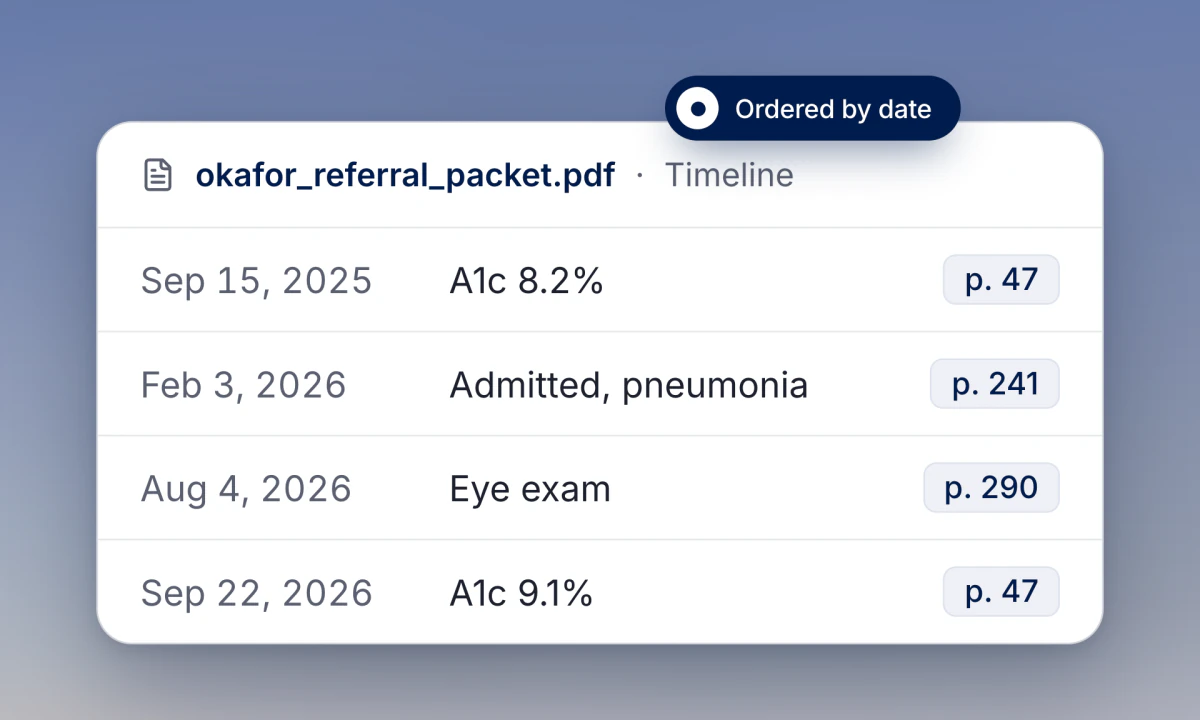
One practical detail matters here. In ClinicFrame, files saved to a patient stay with that patient instead of inside one conversation, so the next person who asks does not upload them again. On the Plus plan, files can run up to 2,000 pages each.
Referrals and Letters
The paperwork does not stop after intake. Referral letters, school and work notes, disability forms, and treatment plans all restate facts the chart already holds. Each one takes a staff member or clinician ten or twenty minutes of copying between windows.
AI drafts these from the visit notes and saved files. A referral letter can pull the reason for referral, relevant history, current medications, and recent results, each with the note it came from. Anything the chart does not show is left marked, so the clinician fills it in or removes it. The clinician reads and signs, because the letter goes out under their name.
The time saved here is modest per letter and large per month. A practice that sends forty letters a month gets back hours, and the letters come out more consistent because they start from the same structure each time.
Scheduling and Connected Tools
Administrative AI is more useful when it can see the tools the practice already uses. ClinicFrame connects read-only to Google Calendar, Google Drive, and Dropbox. Appointments you booked show up on your week, and you can ask about any file you pick from Drive or Dropbox without downloading it first. If your practice relies on another tool, you can request a connector from Settings and say what you would use it for.
What Changes for Your Staff
AI does not remove administrative roles in a small practice. It changes the shape of the day. Less time goes to reading and typing. More goes to checking, deciding, and talking to patients and payers.
| Role | Hands to AI | Keeps |
|---|---|---|
| Front desk | Summarizing intake packets, flagging missing items | Verifying identity and coverage, patient calls |
| Prior auth coordinator | Matching chart facts to payer criteria, first drafts | Portal submission, payer follow-up, escalation |
| Biller | Grouping denials, drafting appeals, A/R questions | Choosing what to appeal, coding, submission |
| Practice manager | Monthly reports from exports | Decisions on staffing, payers, and policy |
| Clinician | Reading outside records before the visit | Judgment, signatures, peer-to-peer calls |
One cost is easy to miss. Review takes time too. If AI drafts twenty appeals and nobody is assigned to check them, the backlog moves rather than shrinks. Decide who reviews what before rollout.
Seats matter for the same reason. On ClinicFrame's paid plans, admin staff such as your biller and front desk work in your account at no extra cost, under the same BAA. That keeps administrative work on patient data inside one agreement.
BAA Questions to Ask First
Every job in this guide touches protected health information. Intake forms, referral packets, denial letters, and billing exports all identify patients. Under HIPAA, any vendor that handles them for you must sign a Business Associate Agreement. Ask these questions before anyone on your team uploads a real file.
Before patient data goes in
- Will you sign a BAA on the plan we are buying, and does it cover every feature we will use?
- Do you use our files or patient content to train AI models?
- Where are files stored, how long are they kept, and can we delete them?
- Who on our team can see which patients, and how are roles enforced?
- Is there an audit log of who opened, downloaded, or changed what?
- Do answers over patient files cite the file and page?
- What does the tool do when the record does not support an answer?
- Does it write into our EHR or other systems, or only read?
For reference, here is how ClinicFrame answers them. It signs a BAA on every plan, Free included. Patient content never trains AI models. Four team roles are checked on the server on every request. Opens, downloads, and changes are logged and kept for six years. Answers over patient files name the file and page. And it does not write into your EHR, so a person moves the reviewed result into the record.
To see how that looks for a whole practice, read about AI for small and medium clinics.
What AI Should Not Do in Administration
The value of administrative AI depends on clear limits. These are the lines we recommend every practice draw, whatever tool it uses.
- Do not let AI submit anything to a payer, a portal, or an EHR without a person approving it.
- Do not let AI decide what to appeal, what to write off, or which patient to call first about money.
- Do not accept a fact about a patient that has no source attached.
- Do not upload patient files to any tool before the BAA is signed.
- Do not use AI to answer patient questions about their care without clinician review.
- Do not let AI-drafted letters go out under a clinician's name without that clinician reading them.
None of these limits slow a practice down much. The reading and drafting still move to AI. What stays with people is the part with legal, financial, or clinical weight.
A Two-Week Pilot Plan
A short, structured pilot tells you more than a demo. Here is a plan a practice manager can run without outside help.
| When | Step | Output |
|---|---|---|
| Day 1 | Sign the BAA, set up roles, pick one job | A signed agreement and a named reviewer |
| Days 2 to 3 | Time the job the old way on five real cases | A baseline in minutes per case |
| Days 4 to 10 | Run the same job with AI on every new case | Minutes per case, including review |
| Days 4 to 10 | Log every correction by type | Wrong fact, missing fact, added fact, or style |
| Day 11 | Ask staff what changed in their day | Three notes from the people doing the work |
| Day 12 | Compare and decide | Keep, expand, or stop |
Count added facts with extra care. A tool that invents a date or a prior treatment, even once, needs a stricter review rule before it touches more work.
Where to Start
Pick the administrative job that eats the most staff hours this month and run one tool on it for two weeks. For many practices that is appeals. For practices that take a lot of referrals, it is outside records. Measure the time from document in to reviewed result out, and count every correction.
If the numbers hold, add a second job. If they do not, you lost two weeks, not a year on a contract. Start with the free tier where one exists, and only with a signed BAA. To compare tools for the billing side specifically, read our guide to AI medical billing.